 woodspick.
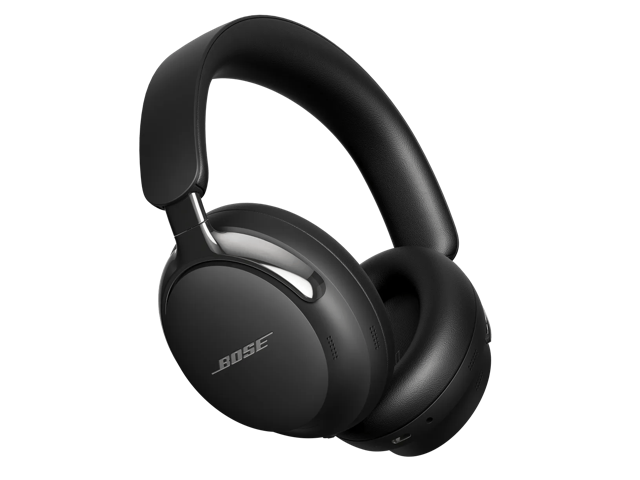
Comfort-led travel, with useful wired listening
Consider the second-generation Ultra when prolonged seated listening and a practical USB-C connection define your purchase. Independent reviewers are notably positive about comfort. Keep listening and calling separate in the decision: RTINGS reports that the headphone microphone is unavailable through the wired connections, so a laptop meeting may need a different input route.
Reasons to consider it. Things to check.
What stands out
- Independent reviewers strongly favor long-session comfort and isolation.
- USB-C digital audio adds a direct computer-listening option.
- Bluetooth multipoint and analog audio provide alternative connections.
Limitations
- RTINGS reports no headphone microphone through wired connections.
- Analog playback requires power; it is not passive listening.
- Immersive Audio reduces the stated battery maximum, and advanced wireless features depend on source support.
The specifications that matter
| Exact model / linked variant | QuietComfort Ultra Headphones (2nd Gen) / Black |
|---|---|
| Bluetooth | 5.4 |
| Multipoint | Up to two active devices; one audio stream at a time |
| USB-C audio | 16-bit at 44.1 kHz or 48 kHz from compatible sources |
| Analog connection | 2.5 mm headphone input via included 2.5-to-3.5 mm cable; power required |
| Wired microphone | Unavailable in RTINGS' wired testing; AUX voice pickup disabled in owner's guide |
| Manufacturer ANC-on playback | Up to 30 hours; 23 hours with Immersive Audio |
| Advanced wireless mode | aptX Adaptive / Snapdragon Sound requires a compatible certified source |
| Water protection | No IP rating; not waterproof |
| Standard box contents | Carry case, analog audio cable and USB-C-to-C cable; power adapter not included |
Buy around the longest session, not the shortest demo
The QuietComfort Ultra Headphones second generation makes the most sense when a long seated session defines your purchase: a flight, a train journey, or a day of alternating music and work. Comfortable headphones that you keep wearing can be more useful than a feature-rich pair you repeatedly take off.
Keep the full product name in view. These are the second-generation over-ear Ultra headphones, not the first-generation Ultra, the separate QuietComfort line, or similarly named earbuds. That distinction changes the connections and features you should expect from a listing.
Comfort is the clearest reason to put them on the shortlist
TechGearLab is particularly positive about comfort, alongside noise cancellation and sound. RTINGS also finds them very comfortable, while identifying changes in sound caused by how they fit different wearers.
That supports a travel-oriented recommendation, not a promise that everyone's ears or glasses will sit comfortably. Check the headband and ear cushions with the glasses, hairstyle and usual posture you actually use. A good seal and a relaxed fit have to coexist. If you keep adjusting one earcup to relieve pressure, the fit deserves more attention than another app setting.
USB-C audio adds a practical computer option
Unlike the Sony WH-1000XM6, the Bose can receive digital audio through USB-C. This is useful when you want to plug into a compatible computer without relying on its headphone jack or Bluetooth connection.
The Bose product FAQ specifies 16-bit USB audio at 44.1 or 48 kHz. Do not turn the lossless label into a claim that it accepts every high-resolution format. Source files, output settings and the complete connection still matter; a different cable route does not guarantee a noticeable improvement in every listening situation.
For a desk setup, try the exact computer port and cable you intend to use. For travel, pack the cable somewhere reachable. Having a useful connection is different from having it available at the moment you need it.
A wired listening connection is not a wired meeting headset
RTINGS reports that the headphone microphone does not work through the wired connections. That is a substantial qualification if USB-C is attractive mainly because you take meetings on a laptop. Plan to use Bluetooth for the headphone microphone, or select a separate computer microphone when listening by cable.
The official owner's guide also requires power for analog listening and explicitly disables earcup voice pickup in AUX mode. A cable is therefore not a universal cure for an empty battery or a restricted workplace setup.
Check your meeting app's input and output separately. Selecting the headphones as an output does not establish which microphone is recording your voice. A short real call on your work device is a better compatibility check than playing a song successfully.
Keep advanced wireless features in context
The Bose supports two active Bluetooth device connections, with one audio source playing at a time. That fits a common phone-and-computer routine. Pausing one source before starting the other is still part of the documented switching process; multipoint should not be read as audio mixing.
The owner's guide ties Snapdragon Sound and aptX Adaptive to a compatible Snapdragon Sound-certified source. Those capabilities are not a reason for every iPhone or Android owner to expect the same wireless mode. Check the actual device before attaching value to a codec logo. The Bose app remains useful for updates, modes and preferences, so check whether your setup allows it.
Use the battery claim that matches your listening
Bose rates playback at up to 30 hours with noise cancellation on and immersive audio off, or 23 hours with both enabled. Choosing an immersive presentation has a runtime consequence; the longer figure should not accompany every listening mode.
Think about the uninterrupted part of your journey rather than a week's total listening. Charge before departure, include the charging lead in the accessible part of your bag, and leave room for settings and volume to change the result. The headphones can operate while charging, but that still requires a suitable power source rather than making the battery irrelevant.
When the second-generation Ultra is worth considering
Choose it for a comfort-led travel shortlist where USB-C listening is genuinely useful. Investigate the Sony instead if calls and more extensive adjustment are your starting priorities, using the head-to-head guide to separate those decisions. Neither option should be chosen solely because the other has a slightly different specification.
View the black Bose Ultra second-generation headphones on Amazon, confirming the full name and bundle. The important question is whether their combination of fit and connections earns a place in your normal routine.
Who this is for
A traveler or desk listener who puts long-session comfort first and will use USB-C playback from a compatible source, while using Bluetooth or a separate microphone for calls.
Consider something else if…
You need the headphone mic to work as part of a one-cable wired meeting setup, require passive analog playback, or mainly want headphones for vigorous exercise.
Sources
Model details checked November 1, 2026. Manufacturer ratings retain their stated conditions. Independent findings are credited to the linked publishers; their test methods and conditions can differ.